
Use case · Offboarding
Save chats during offboarding.
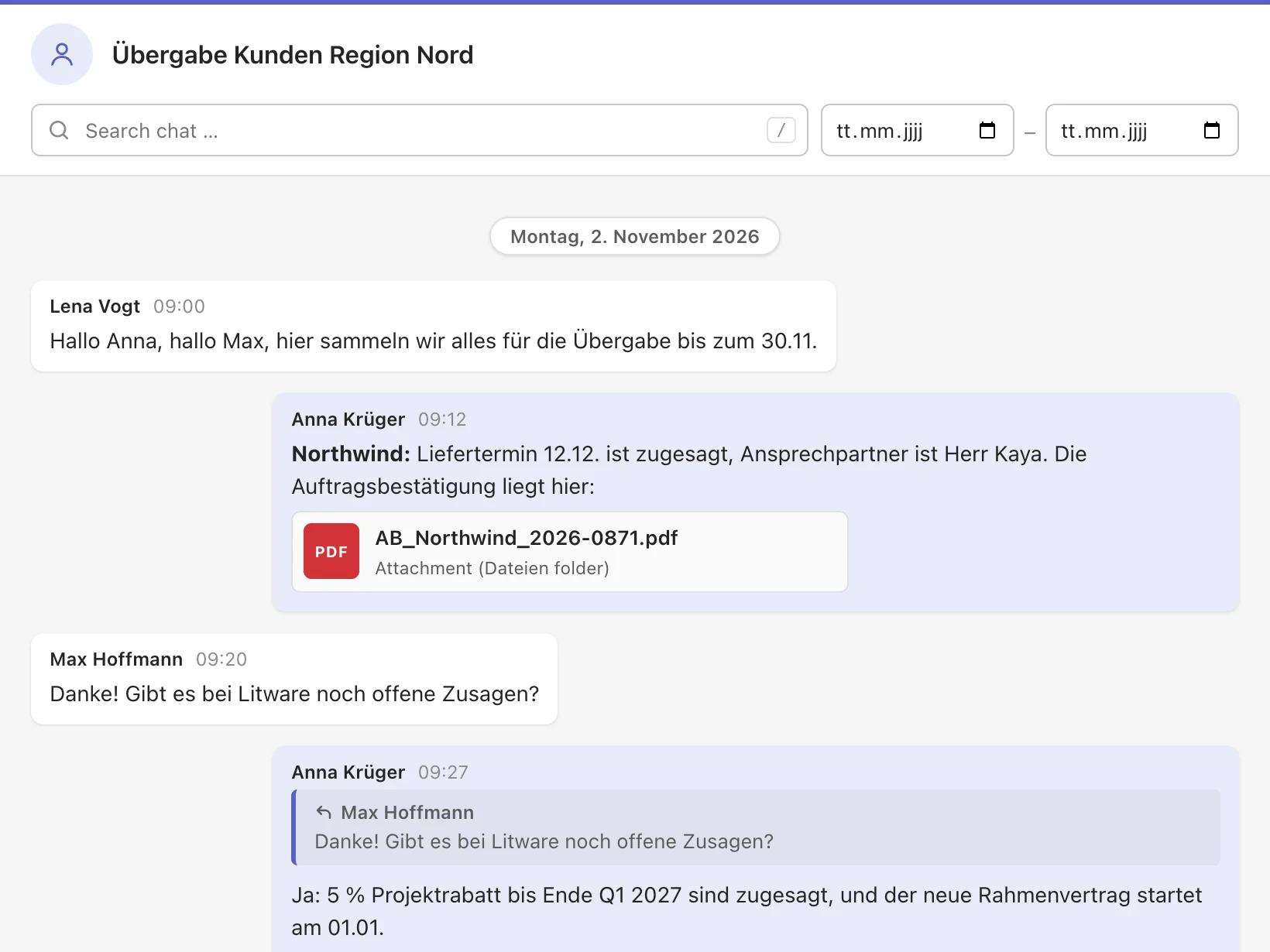
Save the business-relevant chats of departing employees before their access ends, without an IT project and in your own tenant.
By novalutions · Last updated:
Benefits
Knowledge stays, even when people go.
Knowledge stays in the company
Agreements and background do not get lost with the account.
Export by the person themselves
What is exported is what the person running the export can access themselves.
Attachments and files
Inserted images and attached files are included.
Readable without Microsoft 365
The HTML file stays readable without Microsoft 365, as a PDF on request.
Part of the checklist
An export can be added as a fixed step in the exit process.
Easy to find again
Archived chats stay searchable for successors and the team.
When employees leave, chats leave with them
When someone leaves, the account is usually deactivated and the license removed. What happens to chat content depends on your policies. If it is no longer accessible, agreements, background and commitments that only existed there are missing.
Successors and teams then have to reconstruct decisions that were made long ago. This costs time and leads to follow-up questions from customers.
The export belongs in the offboarding checklist
The Teams Chat Exporter is started by the person whose chats are to be saved and only exports content that this person can access. For offboarding this means: the export is added as a step in the exit list and carried out before access ends.
- Select relevant chats with customers, projects and suppliers
- Start the export in Teams and, shortly before the last working day, bring the latest messages up to date with “Alle ergänzen” (update all)
- Move the archive into storage, the project file or SharePoint
- Inform the person responsible for the succession
Observe data protection and co-determination
Chats can contain personal and private content. Before introducing such a process, clarify the data protection requirements and, if applicable, the involvement of the works council. The Teams Chat Exporter supports the technical part. You decide which content is saved.
Also useful when roles change
Information is not only lost when someone leaves. When moving to another department or handing over customers, an export of the relevant chats is also worthwhile. This way the successor gets the context without the previous person having to retell everything.
A typical example
A project manager leaves the company. Her chats contain agreements with three customers, commitments on delivery dates and links to shared files. If the account is deactivated without an export, her successor has to ask for everything anew. If it was exported beforehand, the successor takes over the archive and can continue seamlessly. The example is fictional and only serves as an illustration.
Checklist for introduction
For the export to become a reliable part of the exit process, you should define these points:
- Process and responsibility: who reminds about the export and who checks the result?
- Coordination with data protection and, if applicable, the works council
- Storage location and access for the exported archives
- Retention period and later deletion
In the exit process
Knowledge does not leave with them.
A clean exit involves more than keys and a laptop. The agreements from chats belong to the handover too.
With an export before access ends, the context stays in the company, in a format that anyone can open.
- A fixed step in the checklist
- Export in a few minutes
- Archive independent of the account
Documentation
How it works in detail
The documentation is currently available in German only.
FAQ
Frequently asked questions
Can IT export the chats of a departed employee?
The Teams Chat Exporter only exports content that the person running the export can access. The export should therefore be carried out by the person themselves before their access ends.
How long does the export take?
Usually only a few minutes, even for extensive chat histories.
In which format are the chats available afterwards?
As an HTML file with a folder for images and attachments. It works without Microsoft 365 and can be saved as a PDF if needed.
Do we need an IT project for this?
No. Installation is done once as self-service with a guide. After that, employees export themselves, without IT skills.
What about data protection and the works council?
Before introducing this, clarify the data protection requirements and the involvement of the works council. This is an internal company decision that we do not replace.
You may also be interested in
Try the Teams Chat Exporter for free
Request the trial version and export your chats in your own Microsoft 365 environment.
See for yourself.
Arrange a no-obligation product demo or contact us directly by phone or e-mail. For enterprise customers a free trial version is also available.
- 0221 - 29245920
- info@novalutions.de
- Request enterprise trial
- Luxemburger Str. 150, Cologne