
Use case · Meetings
Prove attendance at meetings.
Export who took part in a meeting and how long each person was present, as proof for trainings, mandatory meetings and billable meetings.
By novalutions · Last updated:
Benefits
Attendance in black and white.
Prove attendance
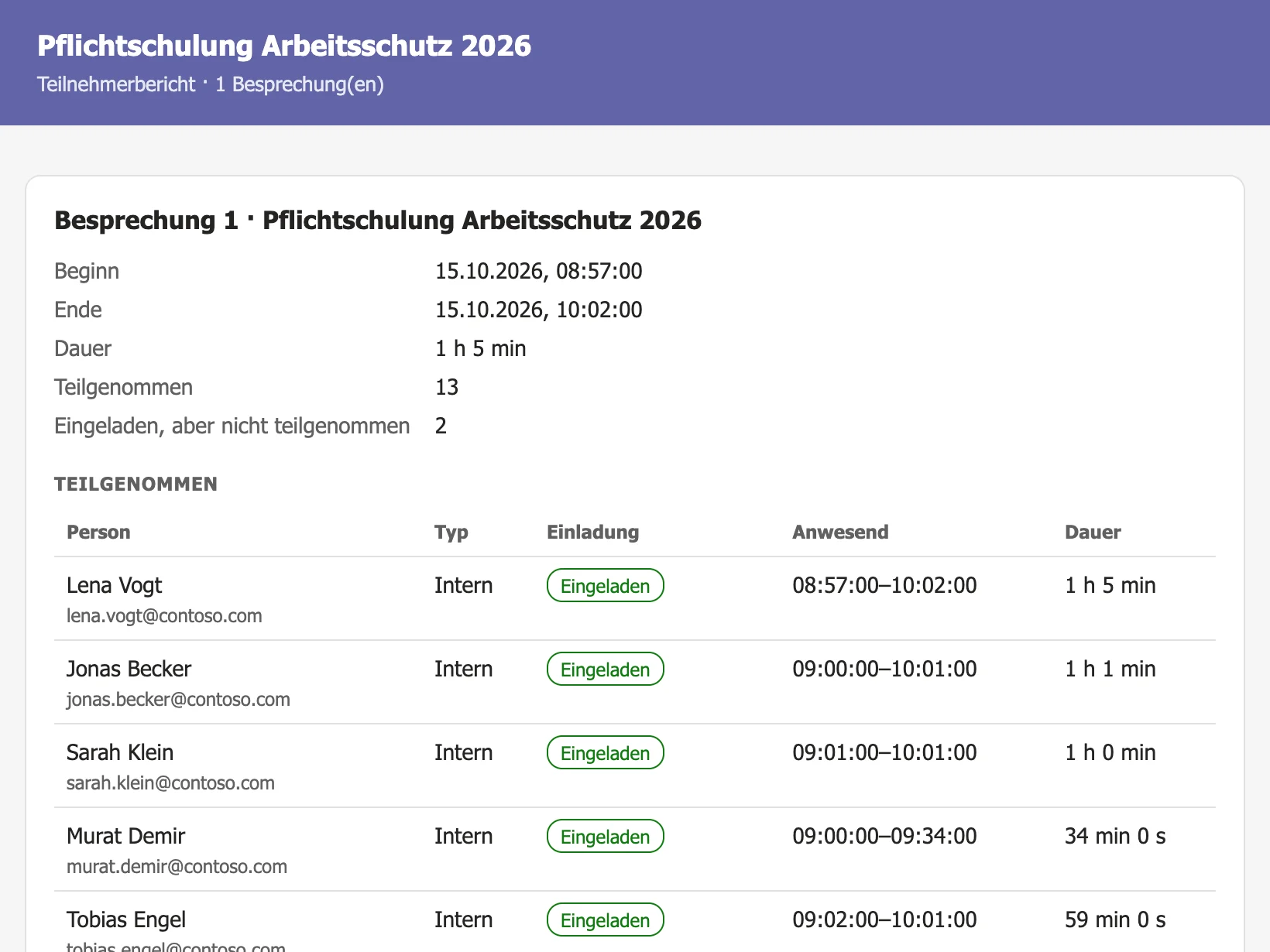
The report shows who was invited and who took part in a meeting.
Attendance duration
How long each person was present, for meetings you organised.
For trainings
Proof for mandatory trainings and instructions.
For billing
Evidence for billable meetings with customers.
In your own tenant
The export runs in your Microsoft 365 environment.
From package L
Attendance reports for meetings are included from package L.
Why attendance records?
For mandatory trainings, instructions, committee meetings or billable customer appointments, the invitation is not enough. What matters is who was actually there and for how long. Without proof it remains a claim.
Teams shows attendees during the meeting. For documentation afterwards you need a report that can be filed or passed on.
What the attendance report provides
The Teams Chat Exporter exports attendance reports for meetings. They record who was invited, who took part in a meeting and how long each person was present. This proves attendance at trainings, mandatory meetings or billable meetings.
Microsoft only provides the attendance times to the person who organised the meeting. The report is therefore best created by the organiser.
- Trainings and instructions: proof of attendance for personnel and quality records
- Mandatory meetings: documentation of who was there
- Billable meetings: evidence of attendance for customer invoicing
Availability and data protection
Attendance reports for meetings are included from package L. Attendance data is personal data. Inform attendees about the evaluation and clarify data protection questions in advance. The export runs entirely in your own Microsoft 365 environment.
A typical example
A company runs a mandatory training online. 40 people are invited, some leave the meeting early. For the personnel file, it should be documented who actually took part and for how long. The attendance report provides exactly this information per person. The example is fictional and only serves as an illustration.
How to use the report
The process is short:
- After the meeting, create the attendance report in the “Meetings” tab
- Check attendance and duration per person
- Move the report from OneDrive into personnel, quality or billing records
What to clarify in advance
Clear rules help the report serve its purpose:
- From which attendance duration attendance counts as fulfilled
- Who creates and files the reports
- How attendees are informed about the documentation
- Whether your package includes attendance reports (from package L)
In everyday meetings
Attendance in black and white.
Meetings take place, but attendance is rarely recorded. A report closes this gap.
This way you have proof if someone asks whether a person was there.
- Attendance and duration per person
- For trainings and billing
- Included from package L
Documentation
How it works in detail
The documentation is currently available in German only.
FAQ
Frequently asked questions
What is in the attendance report?
The report shows who was invited, who took part in a meeting and how long each person was present. Only the meeting organiser receives the attendance times.
What are the reports suitable for?
For example as proof for trainings, mandatory meetings or billable meetings.
Which package includes attendance reports?
From package L. Package S does not include them.
Does the attendance data leave my tenant?
No. The export runs entirely in your own Microsoft 365 environment.
Do I have to inform attendees?
Attendance data is personal data. Clarify the data protection requirements in your company in advance. This is an assessment that we do not replace.
You may also be interested in
Try the Teams Chat Exporter for free
Request the trial version and export your chats in your own Microsoft 365 environment.
See for yourself.
Arrange a no-obligation product demo or contact us directly by phone or e-mail. For enterprise customers a free trial version is also available.
- 0221 - 29245920
- info@novalutions.de
- Request enterprise trial
- Luxemburger Str. 150, Cologne