
Use case · Compliance
Save chats as evidence.
Save chat histories including timestamps, senders and attachments as evidence for compliance requirements or disputes, in your own tenant.
By novalutions · Last updated:
Benefits
Evidence you can present.
Traceable
Messages with timestamp and sender in a readable file.
With attachments
Inserted images and attached files are included.
Independent of Microsoft 365
The archive stays usable for good as a file.
Data stays in the tenant
The export runs in your environment, without a third-party system.
Easy to find again
Filterable and searchable for information requests and disputes.
Your own layout
With the Enterprise package, the export files get a layout according to your corporate design.
Chats are often the only source
Commitments, approvals and notes are often given in the chat. If a follow-up question, an audit or a dispute arises later, these messages are often the only source. Anyone who only keeps them in the ongoing chat depends on its availability.
Readable export instead of a screenshot
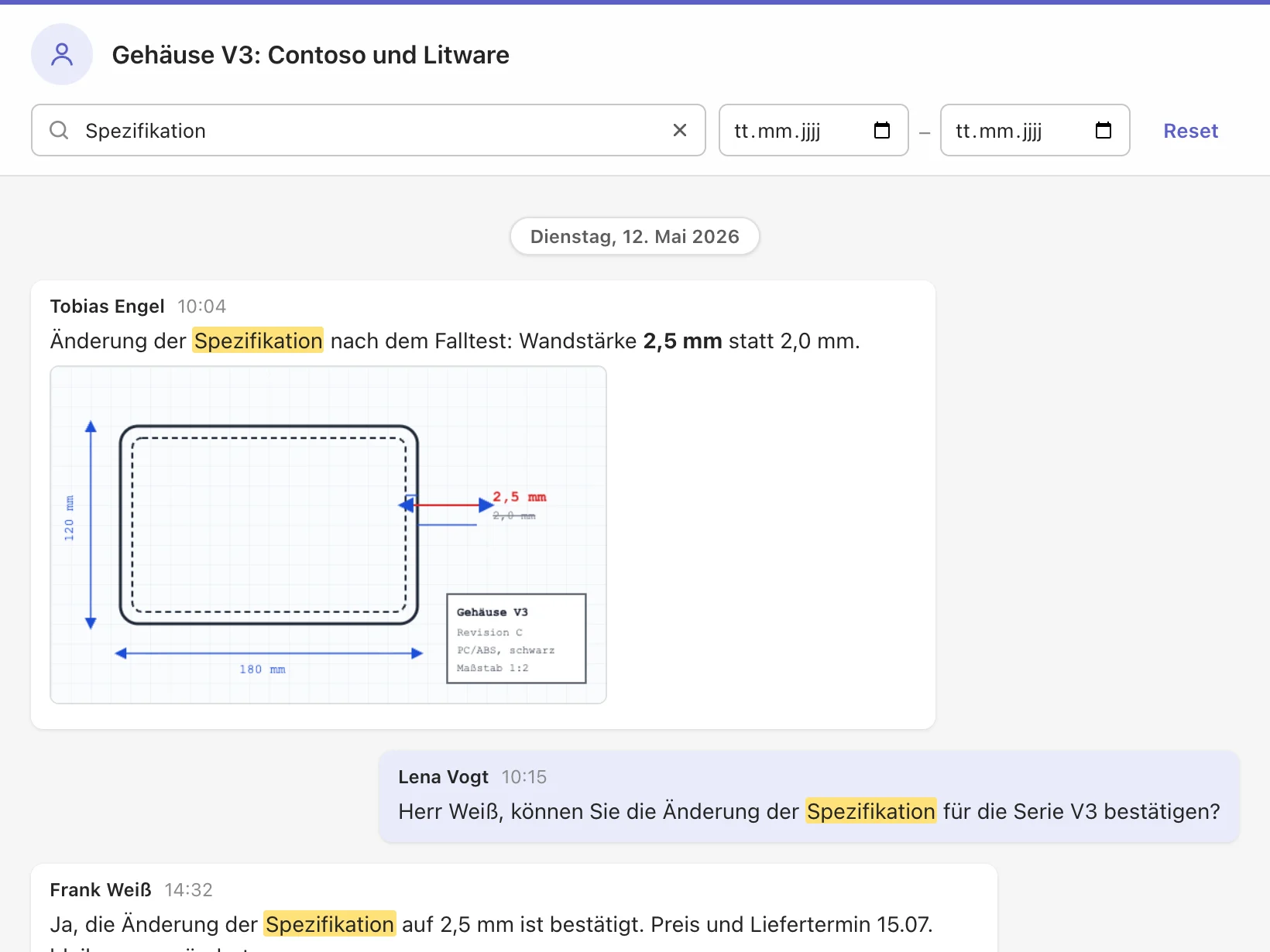
Screenshots show only a section and are hard to search. An export with the Teams Chat Exporter contains messages with timestamps and senders, plus inserted images and attached files. The HTML file is searchable, can be stored permanently and saved as a PDF if needed. If an export is updated later, messages deleted in Teams remain in it.
With the Enterprise package, the export files can get a layout according to your corporate identity on request.
Classification: export and eDiscovery
For formal investigations with cases, searches and review processes, Microsoft offers its own functions with Purview eDiscovery. The Teams Chat Exporter is a complementary solution for quick export by employees. Both approaches can be combined.
Important note on the legal situation
Whether and how an export serves as evidence in an individual case is assessed by courts and auditors case by case. Retention and data protection obligations also depend on the content. Clarify this with your legal counsel. The Teams Chat Exporter provides the technical basis, not legal advice.
A typical example
A supplier claims that a change to the specification was never confirmed. In the project chat there was a clear commitment with a date. Anyone who only has this message in the ongoing chat first has to find and prove it. An export with timestamp, sender and attachments provides the proof in readable form. The example is fictional and only serves as an illustration.
What to clarify in advance
Evidence is only as good as the process behind it:
- Who starts exports and how they are named
- Storage with access protection and clear responsibility
- Retention periods for the respective content
- Coordination with legal and data protection officers
When it matters
Evidence that lasts.
When it matters, what is documented counts. A complete export records agreements before they get lost in the flood of the chat.
The data stays in your own Microsoft 365 environment.
- Timestamps and senders
- Attachments in context
- Readable and permanent
Documentation
How it works in detail
The documentation is currently available in German only.
FAQ
Frequently asked questions
Is an export suitable as evidence in court?
This cannot be answered across the board. It depends on the individual case and on how the court assesses it. Clarify this with your legal counsel.
What does the export contain?
Messages with timestamp and sender, replies, inserted images and attached files, as far as the person running the export can access them. Reactions and meeting recordings are not included.
Does the export replace Microsoft Purview eDiscovery?
No. Purview is meant for formal investigations with cases and review processes. The Teams Chat Exporter complements it with a simple export by employees.
Can we use our own layout?
Yes, with the Enterprise package the export files get a layout according to your corporate identity.
Where is the exported data stored?
In the OneDrive of the person who exports, in your Microsoft 365 tenant. The export does not leave your environment.
You may also be interested in
Try the Teams Chat Exporter for free
Request the trial version and export your chats in your own Microsoft 365 environment.
See for yourself.
Arrange a no-obligation product demo or contact us directly by phone or e-mail. For enterprise customers a free trial version is also available.
- 0221 - 29245920
- info@novalutions.de
- Request enterprise trial
- Luxemburger Str. 150, Cologne